Keeping the human touch in your contact centre CX solutions

Contact centre technology has changed the nature of customer experience (CX). It has reduced the number of agents needed in a contact centre at any one time, improved customer experience by decreasing wait times and reduced the number of errors in a contact centre – to name a few.

Moreover, it has transformed how agents connect with customers and solve their problems. Despite these developments, it is important not to forget the human touch when implementing contact centre CX solutions.

Human agents bring many benefits to a contact centre by:

  • Delivering personalised experiences to customers: Human agents can measure and respond to customers’ emotions with empathy and understanding, which is a significant factor for improving customer loyalty.
  • Handling complex inquiries: A robotic or virtual agent can only take a customer issue so far. If the customer has a complex issue, they will need to speak with someone who can deliver a specialised solution.
  • Building relationships with customers: When human agents work with customers to deliver a flexible solution, they foster the relationship between the customer and your brand.

Ultimately, using human agents in your contact centre can improve customer experiences and increase loyalty. Here are our recommendations for balancing the human touch with new technology.

Listen to what your customers say

You have a difficult job balancing your customers’ needs with introducing technology into your contact centre, especially given every industry and every customer is unique. While adopting new technology is ideal for keeping your business ahead of the competition, you will fall short if you do not listen to your customers and consider their perspectives.

In some cases, customers may be unhappy with your changes. They might not like navigating Interactive Voice Response (IVR) before speaking with an agent. In other cases, they may appreciate the efficiency of new technology but still want to speak with a human when they need assistance.

The key here is to pay careful attention to what customers have to say by listening to their feedback. Of course, you cannot please everyone. But, when you take customer feedback on board, you balance deploying new technology without losing the human touch.

Happy client reading customer comment and feedback

Let customers choose their journey

Not all of your customers will have the same idea of what convenient and great CX looks like. Part of putting the human touch into your contact centre is providing people with choice.

Take AI, for example. It has proved to be valuable for contact centres by automating tasks such as frequently asked questions (FAQs). Customer service delivered by AI saves your business money and time by freeing up agents to work on complex inquiries.

However, just because AI delivers great benefits does not mean it can wholly replace human agents. For some, a chatbot will feel like enough to address their issue, and the ability to send instant messages from their phone or laptop will feel convenient. Others may prefer to speak with a person.

In considering these scenarios, you need to find the balance between AI and human agents. By offering both options, you can provide the best possible customer experience while still reaping the benefits of AI.

Optimise your tech stack to smoothen the customer experience

To get more from contact centre technology solutions, you may need to review your current tech stack and remove processes that no longer serve your business. When agents have to operate within several disconnected programs, it wastes their time and hinders their ability to provide smooth customer service.

For example, if your contact centre or call centre software does not integrate with your CRM, you might consider adopting a solution combining all of the platforms your agents need. You should also listen to agent feedback on the effectiveness of the technology. After all, they are the people speaking directly with the customers and will have heard customer complaints if they were unhappy with an automated process or felt like the agent took too long to find relevant information.

customer support - home banner

Carefully consider new technology before deployment

Deploying too much automation creates sterile CX, disrupts the human touch in your contact centre and hinders your ability to provide good customer service.

It may feel exciting at first to implement trends such as AI and chatbots. But, these technologies will not deliver to your expectations if you do not consider their role in your contact centre. Here, you will need to consider how technology and the human touch work together.

Moreover, technology does fail sometimes. In those cases, you will need human agents to take over.

Ensure agents work in tandem with technology

The key to keeping the human touch in your contact centre is to ensure people and technology work in sync. To ensure this happens, you can:

  • Provide your agents with thorough training on leveraging technology in a way that benefits them, the customers, and the business.
  • You might deploy technology that automates simple inquiries that do not require a human agent (such as FAQs). Agents can then give more time to customers with complex concerns.
  • Ensure that technology does not dominate your contact centre by providing equal access to automated options and customer service agents. You might enable customers to engage with an automated system at first, and if their problem needs specialised help, you can redirect them to the agent best suited to address their problem.

By striking the right balance between technology and the human touch, you can provide excellent customer service that meets the needs of your customers and supports the business.

customer support agents working in tandem with technology

Balance technology and the human touch with Premier Contact Point

Our cloud contact centre solution and customer experience solution delivers technology that enables your agents to add the human touch to their work. We deliver affordable, innovative features, such as visual IVR, CRM integration, overflow queues, self-service options, ivr call flow solutions and omnichannel queueing.

You can get in touch with us to book a demo of our cloud contact centre solution.

5 features you need in an IVR call routing solution

IVR call routing solution

In previous blogs, we have discussed how call queues can build to frustrating lengths for customers and damage your company’s reputation. Long call queues can increase stress for your agents, hindering their ability to deliver excellent customer experiences.

Interactive Voice Response (IVR) re-routes calls through an automated workflow for customers to move through. The workflow ends with a self-service option or directs the caller to the next available agent.


Speech-enabled IVR call routing

There are many reasons why you might leverage speech-enabled IVR. Most notably, it can improve the customer experience by allowing the caller to simply say why they’re calling, rather than forcing them to select from the list of reasons why you think they’re calling. This free form method empowers the caller to more accurately be directed to the team of agents who are best equipped to handle the reason for their call.

Speech-enabled IVR generates financial return by automating processes and reducing the number of human agents needed in a contact centre. Over time, your operating costs will lower and you can allocate your budget to areas of your contact centre or business that need additional resources.IVR Call Routing

Offer visual IVR in your call routing strategies

While speech-enabled IVR has its merits for use in contact centres, we recommend not leveraging it as your only IVR play.

Some people find traditional IVR frustrating. They might be in a situation where they are unable to listen, or may prefer to read through the options in their own time.

With a visual IVR menu, customers can view the options rather than listening to and remembering the corresponding number they need to enter using their telephony keypad, to route their call to someone who can help them. This can make it easier for customers to make choices and resolve their queries, resulting in a smoother and more satisfying customer experience.

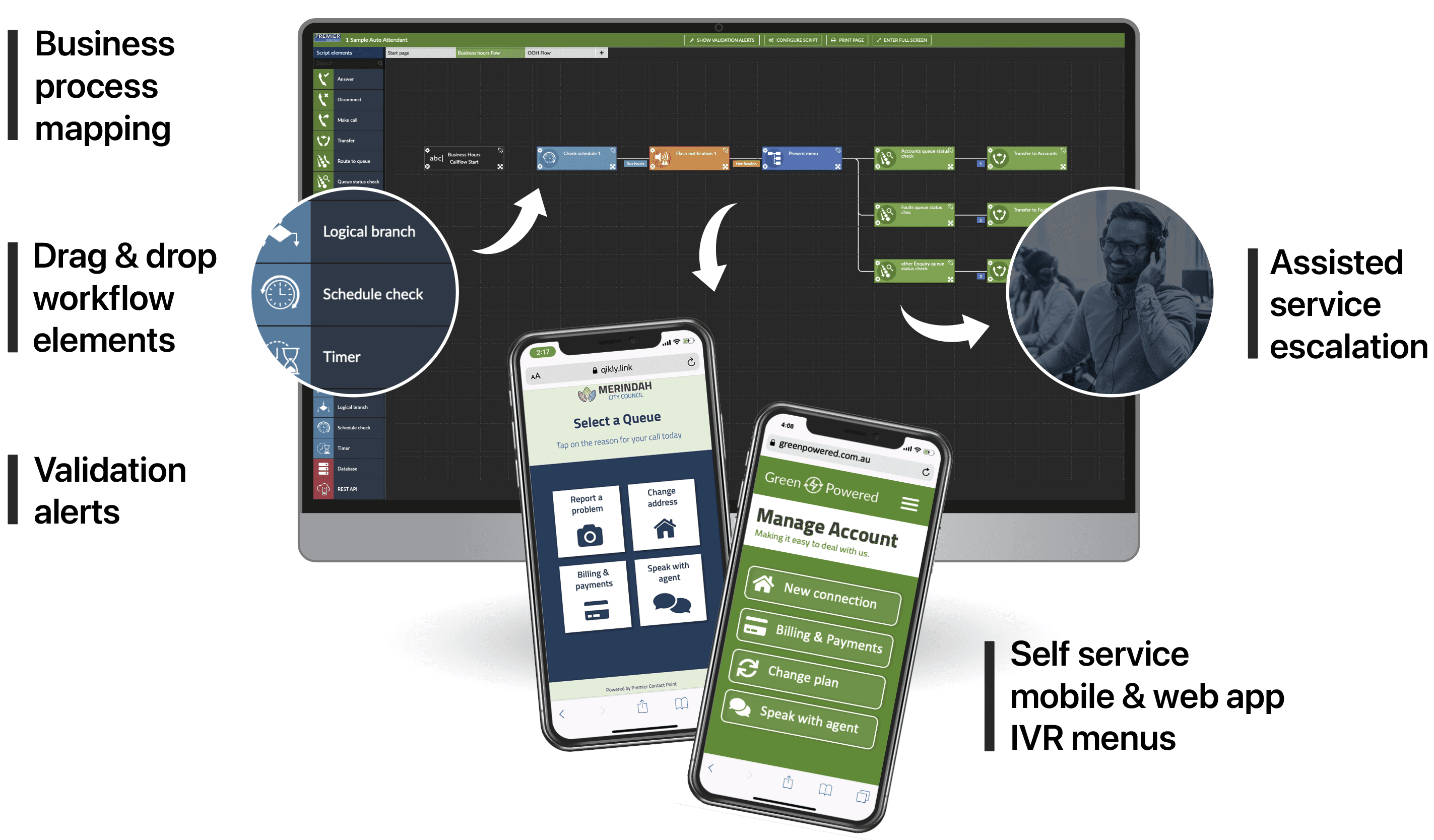
Visual IVR provides callers with a list of options in an app-like experience that they can follow on their smartphone. It will prompt them to follow self-service workflows that are designed to resolve their issue, taking the strain from your call queue and your agents. If the caller needs to be connected with an agent, the agent will have the customer’s information ready to go when they take the call.

A study by Salesforce found that 80% of consumers believe CX is equally important as quality products and services.


Personalised contact management supports IVR call routing

Contact management stores and collates all customer data collected by your company. It includes a person’s name, contact details, and any information about the previous contact with the business (such as past calls or purchases). A robust contact centre solution should provide your agents with the ability to view this data from a single interface.

When agents have customer data on hand, they can deliver more personalised experiences when the person reaches them through the IVR workflow. Rather than customers starting again when they reach the agent, they will know why they contacted the company when taking the call. This allows your agents to provide a more personalised experience with each customer and customers have a consistent and positive experience.

Agents can add notes about the customer’s query while on the phone with them. Other agents can then leverage this information if that person calls again or the data can be used to automatically route the customer to the last agent they spoke with.

business process mapping screenshot

Create your IVR callflow with no-code design

No-code design is a principle leveraged in modern development for activities such as website building. If you have seen a commercial about drag and drop website design, you are likely familiar with the functionality. You essentially modify the software without hiring someone with coding skills as the software provider manages that on their end of the platform.

No-code contact centre or call centre software software delivers a customisable solution that you can tailor to suit your needs without worrying about updating the code. Your Contact Centre as a Service (CCaaS) provider will manage the software’s backend while you personalise the platform.

Our IVR solution leverages no-code design that allows you to customise workflows in real-time. No-code in an IVR setting enables you to design the IVR workflow you would like your customers to move through.

For example, you might build your workflow to start with a welcome message. Then, introduce the first round of options, potentially adding a self-service section for your customer to work through. When you need to change your IVR callflow, you can do so without waiting for coding changes from a developer.Call Centre Software

Reporting on how customers interact with your IVR solution

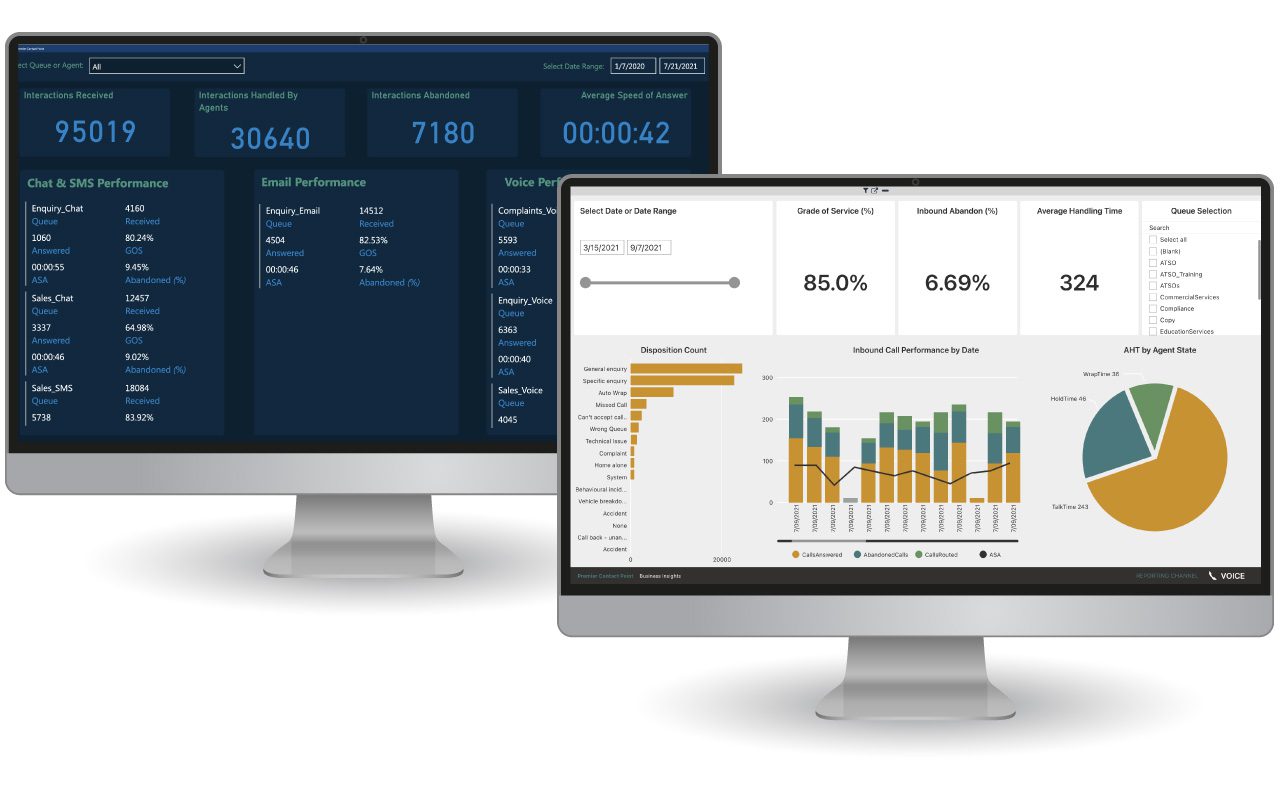
Just like you need robust reporting capabilities across your contact centre, you need business intelligence that delivers insights specifically about your IVR solution. You can choose from reports tailored to your business, choose from a list of out-of-the-box reports or create your own reports with a no-code report builder.

With these insights, you can pinpoint areas for improvement, such as how many times a customer needed to hear or view the prompts again. Additionally, IVR reporting tracks customer satisfaction levels and measures the effectiveness of the IVR solution overall.

With IVR reporting, you have a range of options that you can choose from to leverage the reports best suited to your business. For example, your top priorities at any given time might include:

  • How many calls the IVR self-service workflow handles instead of an agent
  • How many customers show a preference for speaking to an agent
  • Specific points in the workflow where a customer terminates the call

You can then make decisions to change the workflow or add more self-service options for common customer problems. You can combine IVR data with other metrics collected in your contact centre to help you make more informed business decisions.

PwC found that 70% of consumers specifically prioritise speed, convenience, helpful employees and friendly service when liaising with a company.


How Premier Contact Point supports IVR in your business

Today’s contact centres require self-service options or the ability to route customers to an appropriate agent after they complete an IVR workflow.

Our cloud contact centre solution and customer experience solution can help you achieve your dream of delivering the ultimate customer experience.

IVR

Why you need call centre software with business reporting and intelligence

call centre software with business reporting and intelligence

Your company’s success partially relies on whether you deliver an excellent customer experience. But, how do you measure your delivery?

The answer to that question lies in the data and insights captured by call centre software with reporting and intelligence. 

Many call centre managers all over Australia will relate to one point of frustration: lacking software that delivers call centre data in easy-to-understand and configurable, real-time and historical reports. Call centre leaders need this type of software to track what is going on with their team, measure how they compare to past performance, make informed decisions on how to change call flows and plan for future demand.


Real-time management for call centre leaders

Leaders in a call centre need information at their fingertips to effectively manage call centre operations in real-time. Your call centre likely has a lot of activity occurring at once. You may need to review wait time, average handle time (AHT), sales tallies or other KPIs that your company deems a priority. For these reasons, you need call centre software with flexible reporting and intelligence capabilities.

When you have access to real-time data and reports, you can make quick and informed decisions that improve performance in your call centre. For example, if an issue arises within your call centre and impacts a KPI, the call centre software will alert you to the problem through visual and audible alerts as well as email and SMS alerts. From there, you can work with your agents to resolve the issue.

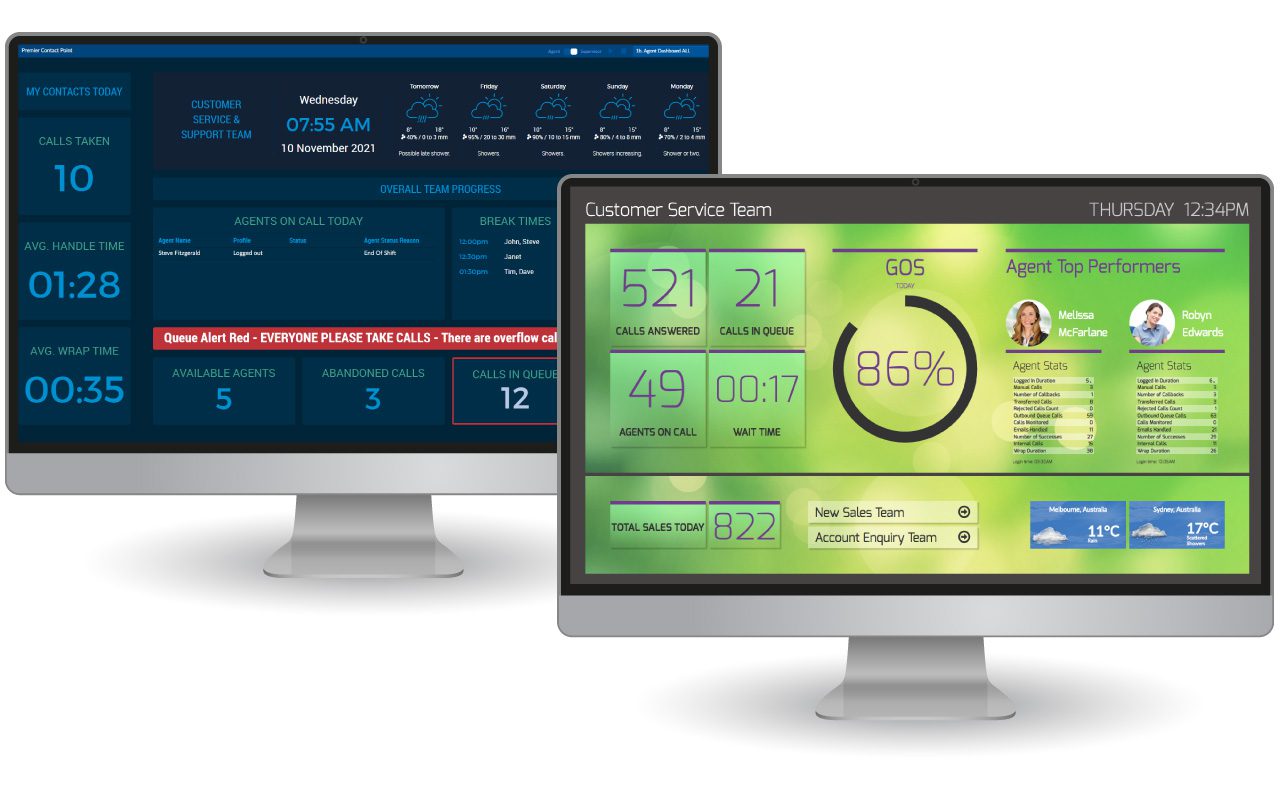
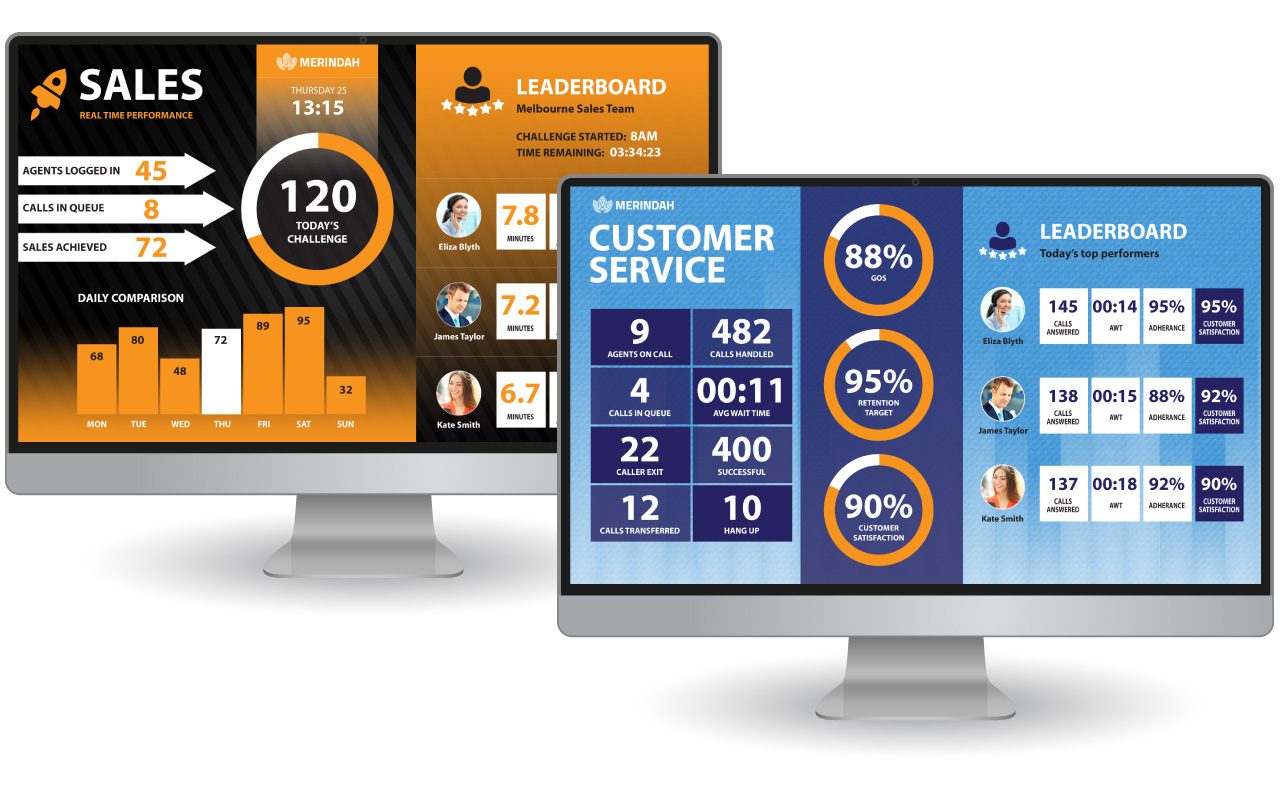
Furthermore, call centre software with customisable dashboards, such as Premier Contact Point’s software, allows you to display the reports you need in a format that suits you.

Agent Desktop Reporting

Deliver real-time insights to your agents

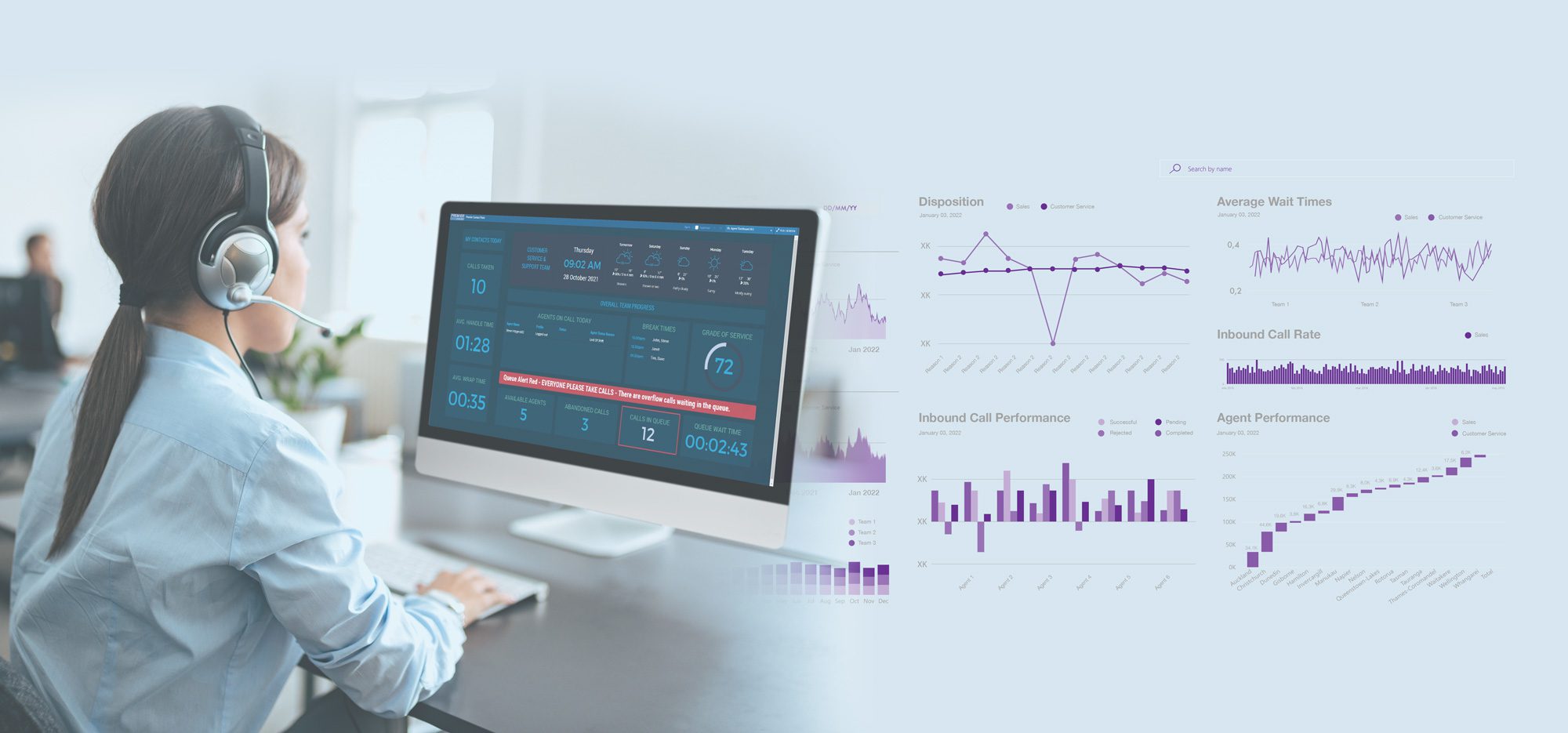
Call centre software with business intelligence and reporting capabilities also delivers real-time insights to your call centre agents. From these insights, agents can become more autonomous and make better decisions and improve customer service, no matter where they’re located. With KPIs on hand and easily accessible, agents can also stay alert to issues and contact their manager for assistance if needed.

Reporting and intelligence also can improve agent motivation because the reports monitor their performance in line with their KPIs. Only 26% of employees interviewed in a Gallup survey agreed that they received clear feedback on how to do their job better. Call centre software with reporting and intelligence tools highlights what agents have achieved or not missed, which provides a source of motivation.

The agent dashboard can notify them if they are falling short and alert their manager to get help in addressing the issue. Perhaps their average handling time is too long, or that there is a lot of idle time because they do not have enough calls coming in. Either way, agents can leverage their reporting dashboard to address any issues.

dashboard samples with monitor


Manage sales campaigns from your call centre software

When your marketing department releases a new sales campaign, your agents will need to be ready for the increased call volume that follows. When experiencing high call volumes, it is crucial that you pay particular attention to wait times, average handling times, and callbacks. Especially when 48% of customers will tell more than ten people if they had a negative experience with your company.

Suppose a particular metric, such as the number of abandoned calls, falls into the red. You can investigate the issue and reallocate resources to ensure enough people are online to address the high number of calls. Alternatively, you can change your queue configuration in real-time and offer callers the ability to receive a callback when they reach the first position.

When you have call centre software with business reporting and intelligence, it allows you to manage sales campaigns in real-time. They can make changes to the campaign as it is happening and get the most out of it. With this type of software, leaders can get up-to-the-minute information on how their campaigns are performing. They can also make changes on the fly, based on what they see in the reports. Call centre software allows them to maximise their sales potential and improve customer service.

Leaderboard samples with monitor for sales and customer service

Leverage reporting and intelligence to make future-facing decisions

Leaders can also use the data from the reporting and intelligence to make better decisions about future sales campaigns.

Reporting features allow you to gather data about your campaign performance, while intelligence features provide insights that can help you improve your campaign results. With this information at your fingertips, you can make informed decisions about allocating your resources and achieving better outcomes for your business.

When the sales campaign ends, you can create a report that analyses queue and call types and suggests staffing requirements for the next campaign. If your call centre software can integrate with external data sources like your CRM platform, you can leverage that data to build even more informative reports.

The right call centre software provides your team with the business reporting and intelligence they need to make future-facing decisions. With the ability to track agent productivity, access call recordings, and get insights into customer behaviour, you can make informed choices about how to improve your call centre operations.

Call Centre Software

Call centre software delivers historical reporting and intelligence

Eighty per cent of companies have cited customer experience improvements as a top priority. So, business reporting and intelligence features are essential for keeping you competitive and helping you make future-facing decisions about sales campaigns to improve customer experience.

Leaders of call centres need all the help they can get to make informed decisions, and call centre software with reporting and intelligence provides that. This software delivers historical reporting and intelligence and allows call centre leaders to analyse data collected over time. You can leverage this information to make informed decisions about improving your call centre’s performance.


Premier Contact Point delivers business intelligence and reporting

Today’s call centres require flexible and real-time reporting delivered to managers and agents in a highly complex and ever-changing business environment. With the right data at your fingertips, you can make informed decisions about your call centre as issues occur and plan for future demand by reviewing historical data.

Our call centre management software helps you achieve your dream of delivering the ultimate customer experience through our Reporting and Intelligence capabilities.

Microsoft Teams Integration for Contact Centre as a Service

Microsoft Teams integration for Contact Centre as a Service

I speak with many companies who install custom call centre software or use multiple tools to meet the needs of their customer service and sales teams. While these tools might deliver many of the features needed, agents often need to access them in different ways, impacting their ability to provide an excellent customer experience (CX).

Microsoft Teams integration for contact centres provides a central place for agents to communicate with customers and collaborate with others inside your organisation. It integrates with Contact Centre as a Service (CCaaS) solutions to deliver voice calling, instant messaging, presence and one-click transfers, all in a single user interface. 

Depending on your staff’s preferred way of working, they can choose from two options to best leverage the integration of these two powerful applications. Either embedding the CCaaS solution within the Teams user interface or embedding Teams functionality within the CCaaS user interface.


How Contact Centre as a Service benefits customer service teams 

CCaaS is a software deployment model that delivers contact centre technology services via the cloud. It allows you to outsource your contact centre technology to a service provider that manages the service within their infrastructure. 

CCaaS provides a range of benefits, including: continuous enhancements and feature updates, no need for internal ICT skills to manage the technology resulting in reduced support costs, high levels of scalability, reliability and availability, a better customer experience and agent experience as well as better transparency and significant cost savings.


Microsoft Teams and CCaaS integration enables agent collaboration

Microsoft Teams is a communications and collaboration platform that integrates and expands the capabilities of your contact centre software by providing an efficient way for employees to communicate with customers and each other.  A best-in-class solution enables either the Teams functionality to be embedded within the CCaaS interface or the CCaaS interface to be embedded within Teams.

For agents whose primary function is to process large volumes of inbound and outbound customer interactions, across a range of contact channels like voice, email, chat and SMS they may prefer embedding the Teams functionality within the CCaaS user interface. This ensures they can easily connect with colleagues across the organisation for call transfers or for assistance in answering customer enquiries whilst still accessing the CCaaS user interface for the majority of their work.

However, for staff who need to spend the majority of their work day within Teams (mainly communicating within the organisation) and only occasionally take customer service or sales calls, then embedding CCaaS within the Teams user interface may provide a better experience for your staff.  

Whatever their function, by having one interface, agents can communicate and access the information they need. By collaborating on projects, agents can achieve better results for customers. Agents can quickly identify the availability of their colleagues to determine if they are ready to receive a call or join a three-way conference call. If so, the agents can connect with their colleague with a single click.


Connect agents with subject matter experts in your business

Microsoft Teams and CCaaS integration goes beyond improving CX and connects agents with subject matter experts. Contact centre agents can easily collaborate with subject matter experts to immediately get the answers they need for a customer, which creates a more streamlined customer service experience. Experts can also easily offer their help, which will improve customer satisfaction.

Microsoft Teams integration bridges the gap between contact centre agents and subject matter experts by allowing them to connect in real-time and from anywhere in your organisation. Agents can reduce call handling times by contacting the right person via click-to-call or direct message.

If agents are unsure who to contact, they can identify experts by department. Once they have found the right person, agents can initiate a one-on-one call, a conference with the customer or transfer the call to the subject matter expert. Regardless of how the agent handles the call, the goal remains to resolve the customer’s issue the first time, every time.


Improve first call resolution with Microsoft Teams integration

First call resolution is a key measure to ensuring your agents deliver outstanding CX. Microsoft Teams and CCaaS integration helps to improve first call resolution by enabling agents to quickly identify and solve problems or access previous customer information without ever leaving the agent desktop.

When contact centre agents have access to the caller’s profile and history, they can quickly address their needs on the first call.

First call resolution times decrease when agents connect callers to the right people. By identifying subject matter experts, your agents can quickly identify the source of a customer’s issue and provide the right solution. With Microsoft Teams, organisations can also provide a better customer experience by routing customers to agents with specific areas of expertise.

Microsoft Teams is also a great way to keep customer interactions organised.  All conversations with customers are archived and searchable, so agents can quickly find the information they need, which helps ensure that agents always have the most up-to-date information at their fingertips.

Premier Contact Point integrates with Microsoft Teams

Premier Contact Point leverages the power of Microsoft Teams to help customer service and sales staff take customer experience to the next level. Request a demo for more information on how we can help you get more out of Microsoft Teams.

7 reasons you need to re-evaluate your call centre technology

Call centre technology

Our hyper-connected world has ushered in new customer expectations. When we email, instant message, and share on social media in our personal lives, we expect this level of connectivity from the organisations we interact with.

Many Australian contact centres have upgraded their operations to meet these demands for omnichannel convenience. The pandemic  also fast-tracked digitalisation in contact centres as working from home became the norm. Changes to how contact centres operate show no signs of slowing down. For your customer service function to keep up, I recommend considering the points below to re-evaluate your contact centre technology.

1. You cannot access your call centre technology from anywhere

COVID has helped many organisations understand where the deficiencies were, and may continue to be, in their business continuity plan. For many, one of the worst areas of performance was enabling their workforce to work from any location instantaneously.

On-premise contact centre solutions are typically unable to provide access to the software from external locations. Even those using an on-premise/cloud hybrid system have found it difficult. However, you can utilise true cloud contact centre solutions from anywhere your agents have access to a web browser and an internet connection and remain a part of a centralised, virtual Australian contact centre team.

Contact centre software further enhances this by integrating your contact centre software with unified communications platforms like Microsoft Teams. These platforms enable agents to collaborate with colleagues and quickly identify their presence status so they can determine their availability to receive a call transfer or join a 3-way conference, all with a single click.

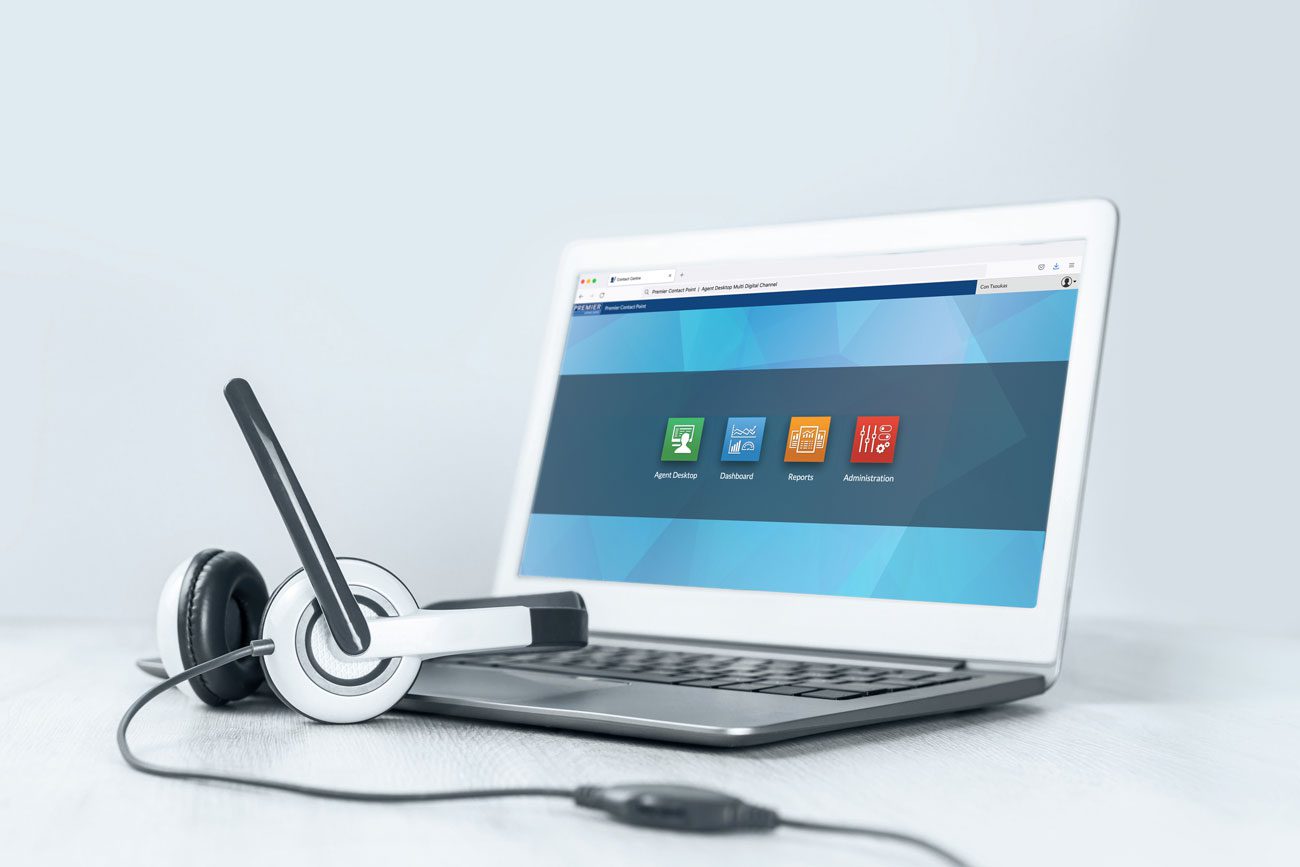
Laptop and Headset for Call Centre Agents Mockup


2. Your contact centre software does not integrate with your CRM

If your contact centre software does not integrate with your customer relationship management (CRM) platform, your agents are likely entering contact data manually or talking to customers without access to all their information when they receive the call. Either way, you are probably not getting the most from valuable customer data.

Integrating your contact centre software and CRM gives agents instant access to information such as the customer’s name, last interaction with your organisation, the reason for their enquiry, the last agent they spoke with and the call’s outcome, which helps agents achieve first call resolution and reduce average handling times. Furthermore, contact centre software can leverage this data to route the customer to the last agent they spoke with, making call routing 100% effortless for your customers.

Integrating your contact centre software with your CRM places customer information at your agents’ fingertips, which helps them deliver an excellent customer experience and achieve more productive workflows.


3. You have too many applications for managing customer interactions

Your call centre technology should reduce the number of applications your agents utilise by providing a single platform for managing customer contact workflows. Agents can leverage one application to access all contact channels and customer interactions instead of working across disparate applications, which wastes your agents’ time and costs your organisation more money.

Frequently, I also see contact centres still relying on email to manage workflows. Traditional email applications — such as Outlook — increase your application stack and often cannot process emails via a regimented workflow which ensures consistency in the delivery of customer service. Essentially: there is no way to guarantee your customer service agents address each email within your preferred timeframes. Contact centre software can replace traditional email applications and become your primary tool for customer email processing. This is essential, as traditional email applications leverage one inbox, accessed by multiple staff, without any structure for assigning emails to agents.

Call centre technology with omnichannel capabilities can provide agents with a consistent and intuitive user interface (UI) to handle all aspects of customer interaction. Omnichannel contact centre software can enable agents to handle all touchpoints that a customer interacts with.

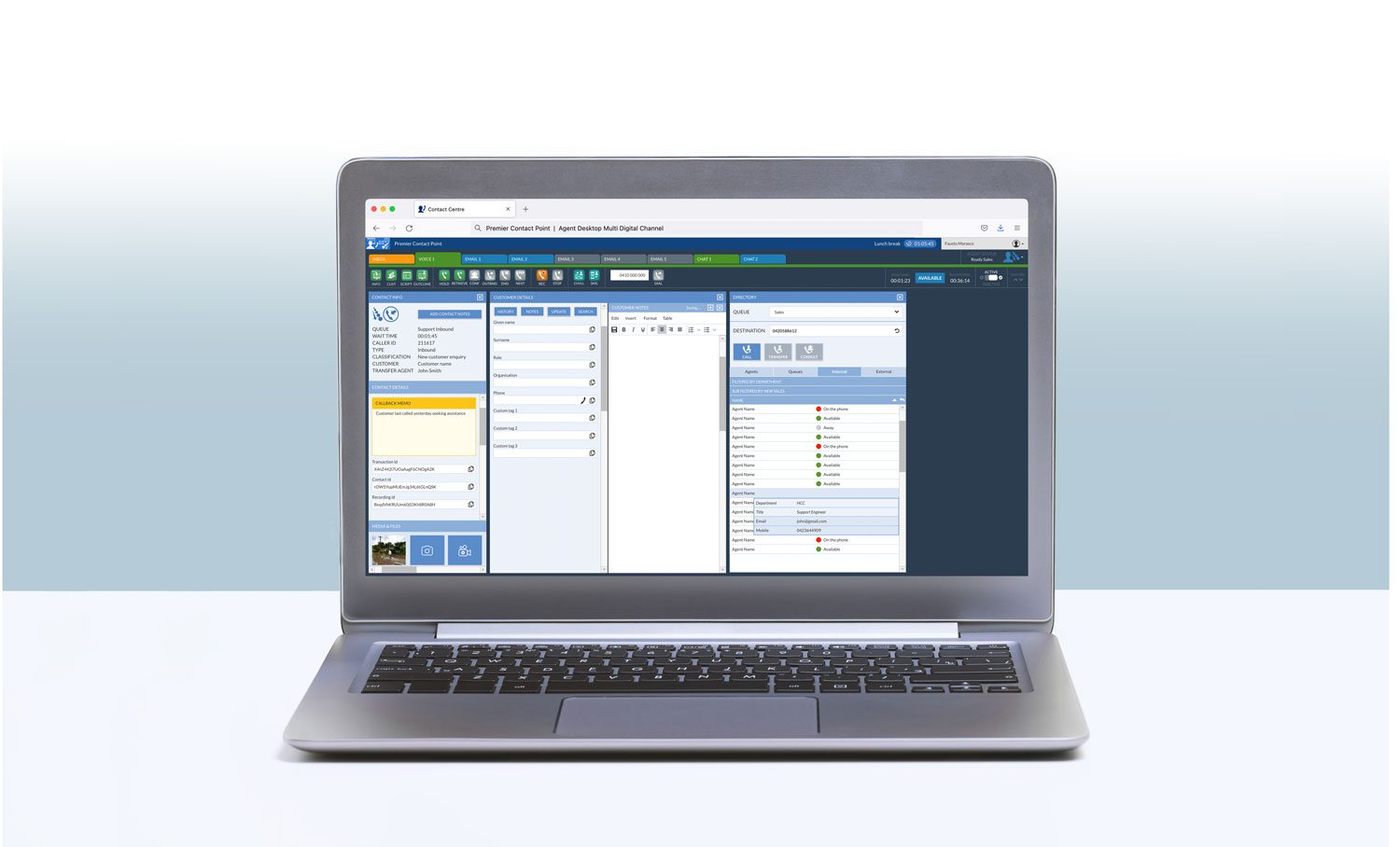
Agent Laptop front view mockup


4. Your call centre technology does not have the reporting capabilities you need

Reporting is among the top three reasons organisations come to Premier Contact Point to discuss how they can improve their contact centre’s performance. Contact centre reports provide actionable insights into what is happening in your contact centre. Real-time dashboards cast a spotlight on service issues and provide a vital tool for supervisors to respond to situations that require their immediate attention. Historical reports are crucial to help organisations make informed business decisions. These insights can help you optimise costs, make changes to your processes, or know where to provide agent support.

The reporting capabilities of your contact centre software must provide you with access to a suite of pre-configured real-time and historical reports and the ability to customise your reports quickly without the aid of the software vendor. Without these tools, your organisation is simply operating blind and unable to make continual improvements to customer service.


5. Your contact centre software lacks quality assurance tools

Call recording, post-call surveys, agent scorecards, and speech analytics offer contact centres a powerful way to analyse customer interactions, improve contact centre performance, highlight agents’ training needs, and create an engaging customer experience.

Investing in contact centre software that offers these capabilities will provide your business with real-time insights into contact centre performance and customer sentiment. Call recording and agent scorecards provide agents with vital feedback on improving customer service delivery, while speech analytics can reduce the time it takes for supervisors to review recordings.

Agent using her desktop for customer support


6. You rely on your vendor for small software configurations

Contact centre solutions often require direct support from the vendor or your internal IT team to change configuration settings. However, waiting for this support for business-as-usual or emergency changes is a waste of time and can negatively impact customer service.

You can remove the impact of such inefficiencies by leveraging contact centre software that is intuitive and allows you to make configuration changes when you need them, instantly.


7. You need call centre technology with workforce management capabilities

Understaffed contact centres can experience significant increases in queue wait times, as well as an increase in customer dissatisfaction. Workforce management (WFM) software in a contact centre helps to ensure you roster the right number of agents with the skills you need when you need them.

Contact centre software with WFM capabilities can also improve agent satisfaction. A WFM solution conveniently allows agents to view their rosters and request shift swaps rather than directly interacting with a manager. Software like this improves agent satisfaction, making them 8.5 times more likely to stay with the company instead of leaving within the first year.

WFM provides workforce planners with real-time adherence reports, which helps them ensure that agents take breaks and attend training sessions on time, alongside a host of other benefits, which enable the smooth operation of the contact centre.


Improve the delivery of your organisation’s customer service with Premier Contact Point

In a highly complex and ever-changing business environment, today’s contact centres require; seamless connections between customer touchpoints, the ability to route customers to the right agent effortlessly, access to real-time and historic BI reporting, effective quality assurance functionality, and robust WFM capabilities.

Our cloud contact centre software solution can help you achieve your dream of delivering the ultimate customer experience.